Home
0
Home

Pivot Table CPE Courses For CPAs

The Last Self-Study CPE Website You Will Ever Need
(Click for Subscriptions)


TL;DR Summary

This page provides CPAs with a curated list of self-study CPE courses focused on Pivot Tables and practical Excel skills, ranging from introductory concepts to advanced dashboards and automation. These courses help accountants work more efficiently with large datasets, improve reporting accuracy, and apply immediately useful spreadsheet techniques across audit, tax, and advisory engagements.


Key Takeaways On Pivot Table CPE

1. Who is this list of CPE courses for?

This list of CPE courses is designed for CPAs and accounting professionals who want to strengthen their Excel and Pivot Table skills through self-study courses, particularly those who regularly work with financial data, reports, and spreadsheets.

2. What is this list of CPE courses about or what problem does this course solve?

This list focuses on Pivot Tables and related Excel skills, offering courses that help accountants organize, summarize, analyze, and visualize large datasets more efficiently while reducing manual spreadsheet work.

3. Why is this list of CPE courses important to a CPA or Accountant?

These courses support accuracy, efficiency, and insight in audits, tax preparation, budgeting, forecasting, dashboards, and management reporting which are key areas where CPAs depend heavily on Excel.

4. When is this list of CPE courses relevant or timely?

The courses are relevant throughout the year, particularly during audit seasons, tax filing periods, month-end closings, and budgeting or forecasting cycles.

5. Where can this list of CPE courses be found and accessed?

This list is available on the cpethink.com website within its self-study CPE course catalog, where Pivot Table and Excel-related courses can be searched and accessed online.

6. How is a list of CPE courses like this consumed or used?

CPAs use this list to review course options, compare credit hours and formats, select relevant Excel topics, and complete self-study CPE at their own pace to meet licensing and professional development needs.


Item Types:
Field of Study:
Authors:
CPE Hours:
Keyword:
Records per page:
All Items
Records per page:


Pivot Tables: Your Ultimate Option for Transforming Data into Valuable Insights

While accountants must deal with a massive amount of data, working with raw spreadsheets can feel overwhelming. Whether you use Google Sheets or Microsoft Excel, Pivot Tables are your secret weapon to turn data into clear, actionable insights.

By pursuing CPE Pivot Table, you can make massive spreadsheets the foundation of accurate reporting, strategic financial advice, and compliance. With them, you can reduce errors, save time, and elevate the quality of client deliverables.
On this page, we’ll explore how completing Pivot Table CPE helps you gain a competitive edge in professional accounting.

Let’s start with the basics.

What Are Pivot Tables?

Pivot Tables are dynamic tools that let you:

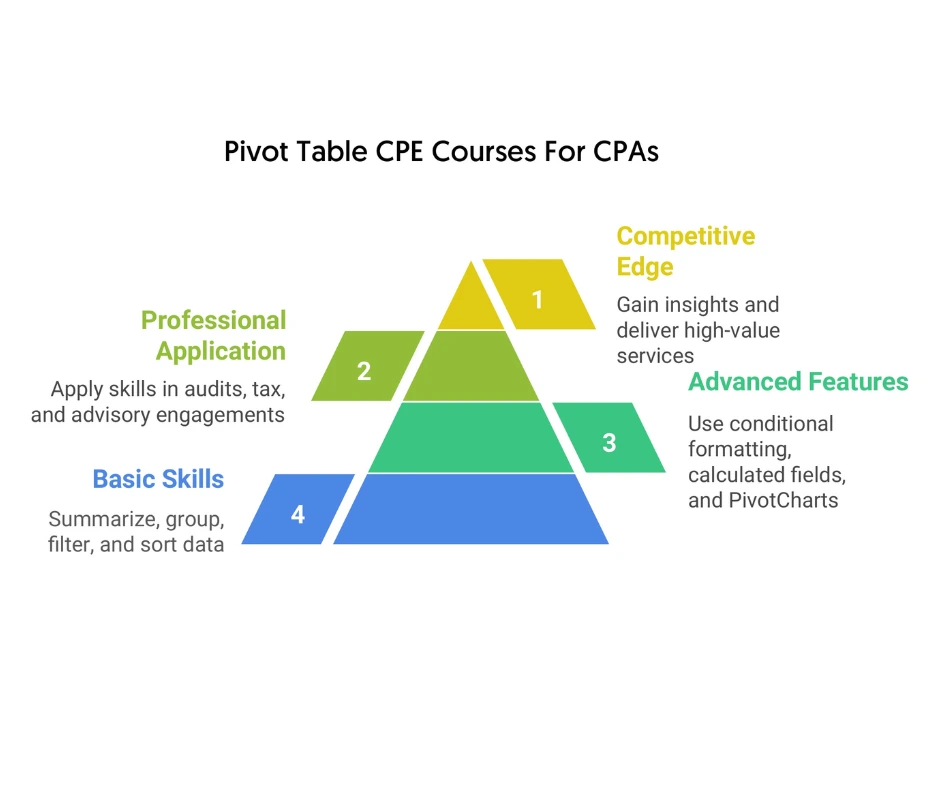
  • Summarize massive datasets quickly.
  • Group and categorize data without manual sorting.
  • Filter the data based on values and conditions.
  • Identify patterns that are otherwise difficult to spot.

CPE Pivot Table: What You Can Expect to Learn

By joining the right online Pivot Table CPE program, you can master the key features of this professional tool. These include:

  • Summarization: You can automatically calculate totals, counts, averages, and other functions for numeric data.
  • Pivoting: You can use the drag-and-drop interface to move fields across columns, rows, filters, and values to analyze data from different perspectives without writing complex formulas.
  • Filtering: You can use filters or slicers to focus on specific data subsets.
  • Grouping: It lets you organize data hierarchically.
  • Sorting: It allows you to highlight key information by sorting data within columns or rows.
  • Drill-down: You can explore hierarchical data by collapsing detailed data back to a summary or expanding summarized data to get underlying details.

Pivot Table CPE: Your Go-To Option to Master Advanced Features

By learning Pivot Tables for CPAs, you can use these advanced features to optimize your workflow.

  • Conditional formatting: This feature allows you to apply colors, bars, or icons based on rules to highlight values and trends.
  • Hierarchical grouping: It lets you create drill-down levels to perform deeper analysis. You can collapse/expand details within categories.
  • Calculated fields: You can create new data fields using custom formulas based on existing fields to perform custom analysis.
  • PivotCharts: These are graphical, interactive versions of Pivot Tables that let you visualize summarized data. They dynamically update when you rearrange or filter fields in the chart or in the Pivot Table it’s linked to.
  • External data sources: You can create Pivot Tables from data outside the present workbook, such as text files, databases, or other Excel files. With this, you can analyze large datasets from multiple sources without needing to copy everything into one place.

Who Does Online Pivot Table CPE Help?

CPA Pivot Table CPE helps finance professionals who regularly need to work with huge volumes of financial data. Whether you prepare audit reports and tax returns or manage budgets and financial forecasts in a corporate setup, Pivot Tables can dramatically improve your efficiency. They let you:

  • Analyze huge numbers of rows of data.
  • Identify trends or anomalies in financial data.
  • Prepare client-ready financial reports with accuracy and clarity.
  • Save a significant amount of time during audits and month-end closing.

In short, they empower you to focus on delivering expert advisory work by moving beyond manual number-crunching.

What Problems Can You Solve by Pursuing CPE Pivot Table?

For accounting professionals, data overload often happens when the volume and variety of data exceed their or their systems’ capacity to understand, process, or use it effectively. This situation typically turns data from a valuable asset into a hindrance that reduces productivity, causes stress, and results in poor outcomes.

Not only is manually sorting, filtering, and calculating data tedious, but it’s also prone to significant human error. However, Pivot Table CPE helps you address the challenges of:

  • Summarizing huge datasets quickly.
  • Calculating averages and totals without using complex formulas.
  • Grouping lots of transactions based on clients, accounts, or time periods.
  • Highlighting variances that might reveal valuable insights or indicate errors.

Instead of spending hours using complex formulas, you can let Pivot Tables do the heavy lifting. This helps you gain valuable insights and offer high-value services to clients.

When Can You Use the Knowledge About Pivot Tables for CPAs?

Pivot Tables become extremely relevant whenever you need to analyze large sets of financial data. Common scenarios are:

  • Client advisory services: You can present cash flow analysis or profitability trends in a clear, easily comprehensible format.
  • Audit seasons: You can quickly summarize transactions based on preparers, accounts, or approval status.
  • Tax preparation: You can categorize deductible expenses based on different factors.
  • Month-end closing: You can deliver clear reports to the management or clients through accurate analysis of revenues and expenses.
  • Budgeting and financial forecasting: You can compare budgets vs. actuals across different time periods or other factors.

In other words, these are useful throughout the year in every major accounting activity.

Where Can Use the Knowledge Gained from CPA Pivot Table CPE?

You can apply the knowledge acquired from Pivot Table CPE wherever Google Sheets or Microsoft Excel sheets are used. This includes:

  • Public accounting firms where spreadsheets are used for financial reporting, audits, tax schedules, etc.
  • Corporate finance departments that use spreadsheets for internal reporting, compliance, and variance analysis.
  • Global enterprises that need to consolidate data from multiple regions or subsidiaries.
  • Small businesses that need to track expenses accurately.
  • Non-profit organizations that want to track donations, forecast program budgets, etc.

Why Should You Prioritize Pursuing CPE Pivot Table?

You should focus on mastering Pivot Tables for CPAs because:

  • They help you save time by reducing manual work and automating repetitive calculations.
  • They significantly reduce errors by eliminating formula-related mistakes, ensuring accurate reporting.
  • They let you gain valuable insights by spotting trends, anomalies, and other factors hidden in large datasets.
  • They help you deliver accurate, professional financial reports to the management and clients.
  • They help you stay competitive in the ever-evolving accounting field.

How Can You Solve the Above-Mentioned Problems?

Here are three simple yet highly effective ways to address the above-mentioned challenges and elevate your professional competence.

  • Join a credible sponsor that offers quality programs on Pivot Tables.
  • Choose the right Pivot Table CPE program as per your professional requirements and personal preferences.
  • Go for online Pivot Table CPE programs to reduce costs.

Closing Thoughts

With consistent practice, you can create Pivot Tables easily and transform large datasets into actionable insights. They can help you generate reports more accurately, audit smarter, and advise clients with greater confidence than before. In the accounting profession, where efficiency and accuracy are paramount, they help improve your competence in a short period of time.

 

seperator


Check out what other customers are saying.



Home > Pivot Table Cpe
Thank you for taking one of our free courses. We would like to be able to let you know when we add free courses or have special offers and will never spam you or share your address with anyone. If you are Ok with that please reply with "Ok" or if not please reply "No Thanks". Either way enjoy your free CPE course.
  
Exam completed on .

Do you want to add the course again?